Plan a Backdoor Roth IRA contribution
A backdoor Roth IRA contribution lets you add money to a Roth IRA when your income is too high to contribute directly. You contribute after-tax money to a traditional IRA, then convert it to Roth. In ProjectionLab, you can plan those yearly contributions with one Roth IRA Flow.
Go to Plan > Flows and add or open your Roth IRA Flow. Under Goal > Yearly Contribution Limit, choose Backdoor Roth IRA, then set your contribution amount and timing.
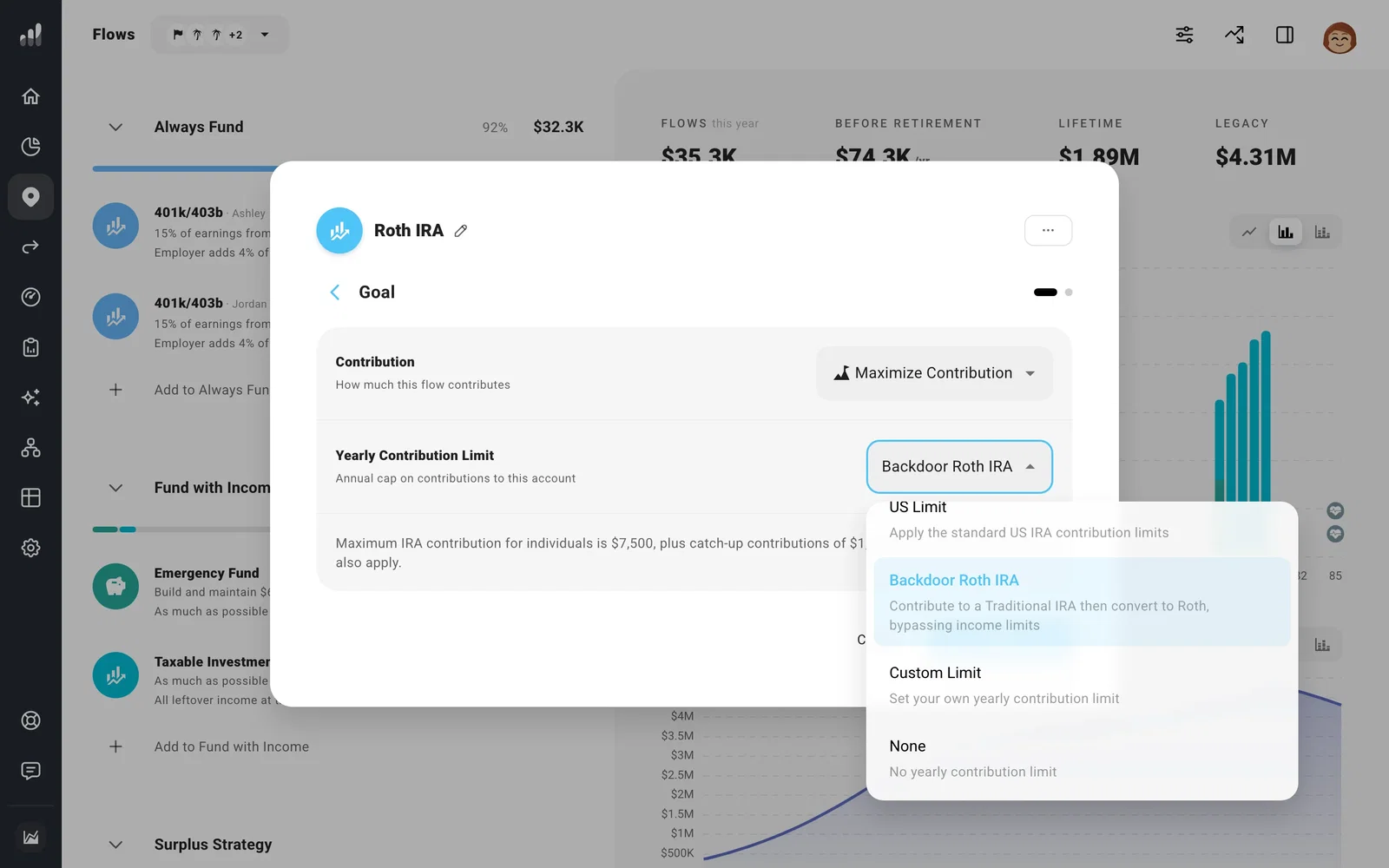
The backdoor option removes the direct Roth income restriction while keeping the annual IRA contribution limit. Traditional and Roth IRA contributions share one yearly limit, so put the one you want funded first higher in Flows.
If you have pre-tax IRA savings
The pro-rata rule counts your traditional, SEP, and SIMPLE IRA balances together when working out how much of a conversion is taxable. Having pre-tax money in any of them can make part of a backdoor conversion taxable.
Estimate the tax on the pro-rata share separately, then add it as a one-time expense under Plan > Expenses in the conversion year. This includes that tax in your plan’s cash needs.
For a separate conversion of existing pre-tax IRA savings, add a Transfer to your Roth IRA. The transferred amount is included as taxable conversion income.
Next: Plan Roth conversions
