Why does my Tax Balance show ACA Premium Tax Credit reconciliation?
If you’ve configured an ACA Marketplace expense, you may have noticed a line called ACA Premium Tax Credit Reconciliation appearing in the Tax Balance panel for some years. This article explains what that line is, why it appears, and what to do about it.
What is reconciliation?
The ACA Premium Tax Credit is paid in advance. When you enroll, you estimate your income for the year, and the IRS pays a portion of your subsidy directly to your insurer each month based on that estimate. At the end of the year, the IRS recalculates your subsidy against the income you actually earned and you settle the difference on your tax return. If you earned less than you estimated, you get an additional refund. If you earned more, you owe some of the advance credit back.
ProjectionLab mirrors this two-step process so the cash flow you see matches what you would experience in real life.
How ProjectionLab estimates your subsidy each year
The simulation has to commit to an advance credit amount before it knows your full end-of-year picture. Here’s why:
Imagine you fill out your application for ACA at the start of the year. The advance credit is calculated off your starting point, the income items you can predict at that moment. Strategy-driven actions like Roth conversions kick in later in the simulation pipeline, and they push your actual income higher. That’s the income you reconcile against.
So the engine works in two passes per simulated year:
- Estimate. Use the income items you’ve explicitly modeled (employment, fixed income, defined-benefit pensions, etc.) to estimate your MAGI and compute the advance credit.
- Reconcile. Run the rest of the simulation – Roth conversions, tax-driven withdrawals, the optimizer’s own strategy choices – which can move your final MAGI. Then compare the advance credit against what you should have received based on the final MAGI.
If those two numbers diverge, the difference shows up as the ACA Premium Tax Credit Reconciliation line in that year’s Tax Balance panel, contributing to the year’s overall tax balance. The net of that balance then settles in the following year’s cash flow as either a Tax Refund or a Tax Payment – modeling the IRS settlement at filing time.
Note
The order matters and is structural, not a bug. The advance credit needs an income estimate before the per-year strategy steps run, and a final MAGI is only available after they run. This is the same constraint the real-world process operates under.
Where to see it in your plan
Three panels surface the reconciliation behavior:
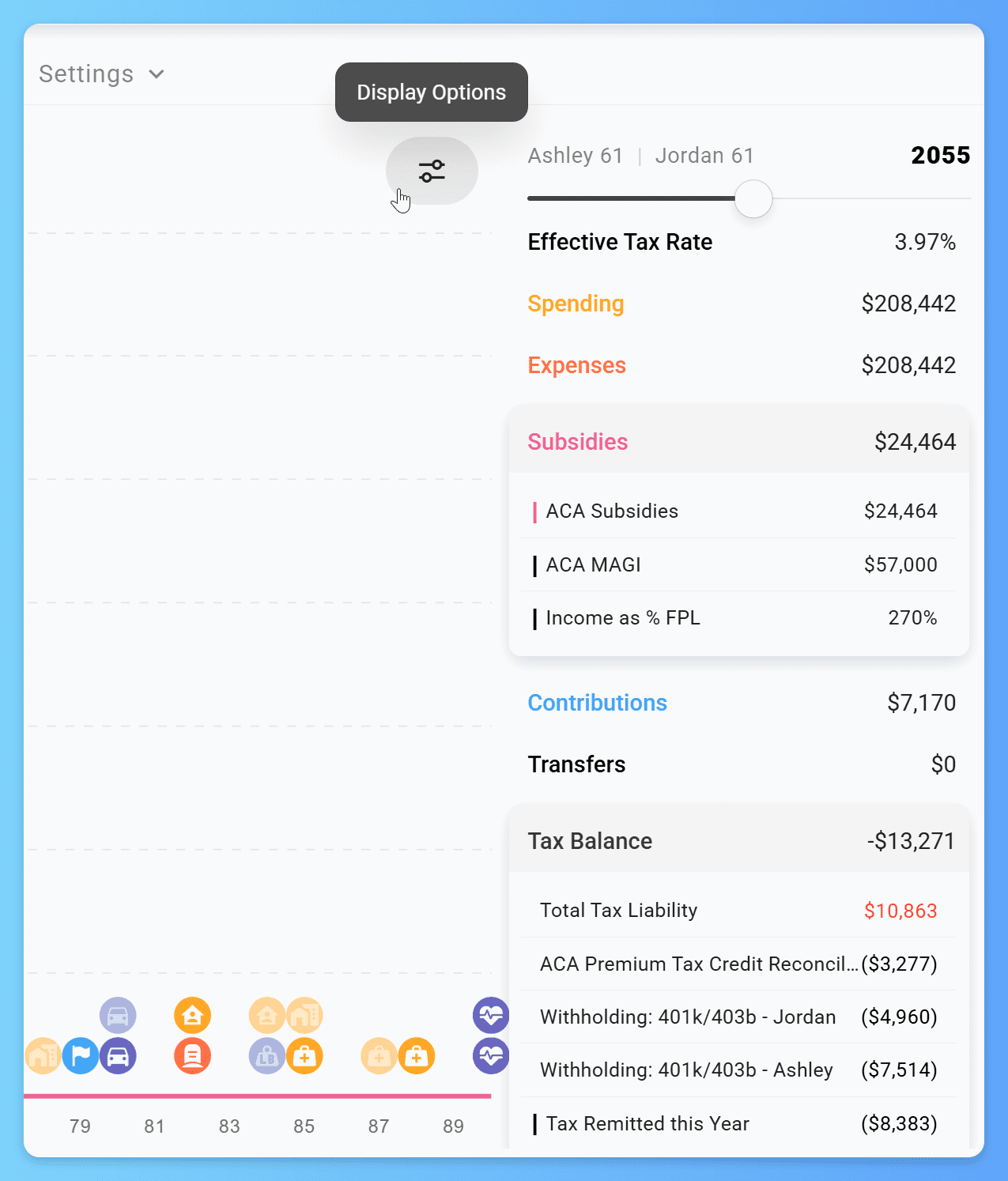
- Tax Balance – in any year where reconciliation occurred, the ACA Premium Tax Credit Reconciliation line appears as a contributor to the year’s overall tax balance: positive if some advance credit needs to be repaid, negative if you’re owed more credit. (A negative Tax Balance overall means a refund is coming in next year’s Cash Flow; a positive Tax Balance means a payment.)
- Cash Flow – the following year’s cash flow shows the net tax settlement as either a Tax Refund or a Tax Payment, since that’s when you’d actually receive or owe the money at filing.
- Subsidies – shows your final, post-reconciliation subsidy each year. Open this panel and disable auto-filter to inspect ACA MAGI and percent-of-FPL year by year.
Note
If you don’t see Tax Balance or Subsidies.
Display Options -> Metric Settings -> Auto Filter -> Off.
Display Options -> Metrics -> Find and Enable the missing items
Common reasons reconciliation is non-zero
If you’re seeing reconciliation entries you didn’t expect, the cause is usually something the start-of-year estimate couldn’t capture:
- A Roth conversion in the same year increased your MAGI above what was used to estimate the advance credit.
- A capital-gains harvest or other strategy-driven realization pushed final income up.
- Withdrawal Shielding is off, so the optimizer pulled from a taxable source it would otherwise have avoided.
- Pretax contributions to a 401(k), HSA, or traditional IRA reduce your MAGI but are recorded after the advance credit is estimated, so the estimate doesn’t reflect them yet. Reconciliation typically refunds the difference in this case.
Reconciliation books the difference between the advance credit your modeled cash flow received during the year and the credit you actually qualified for once your full-year income was known. The advance is estimated from the income ProjectionLab could predict at enrollment, so any of the causes above can move your final income away from it. The entry exists so your modeled total cost of coverage matches what you’d actually pay.
Patterns to manage it
A few configuration choices give you direct control:
- Lower the Advance Credit percentage. On the ACA Marketplace expense, the Advance Credit field defaults to 100%. Setting it to a lower value reduces the monthly advance and shifts more of the credit to the year-end refund, just like a real ACA enrollee would do to reduce reconciliation surprise. Setting it to 0% means no advance is paid at all and the entire credit settles at tax time – useful if your default strategy doesn’t expect to qualify and you want the cash flow to reflect that cleanly.
- Use the Tax Bracket + Preserve ACA Subsidies strategy. When configuring Roth conversions, this strategy caps conversion amounts to stay under the FPL threshold that would phase out your subsidy. Combined with Withdrawal Shielding, this is the cleanest way to keep MAGI predictable and reconciliation small.
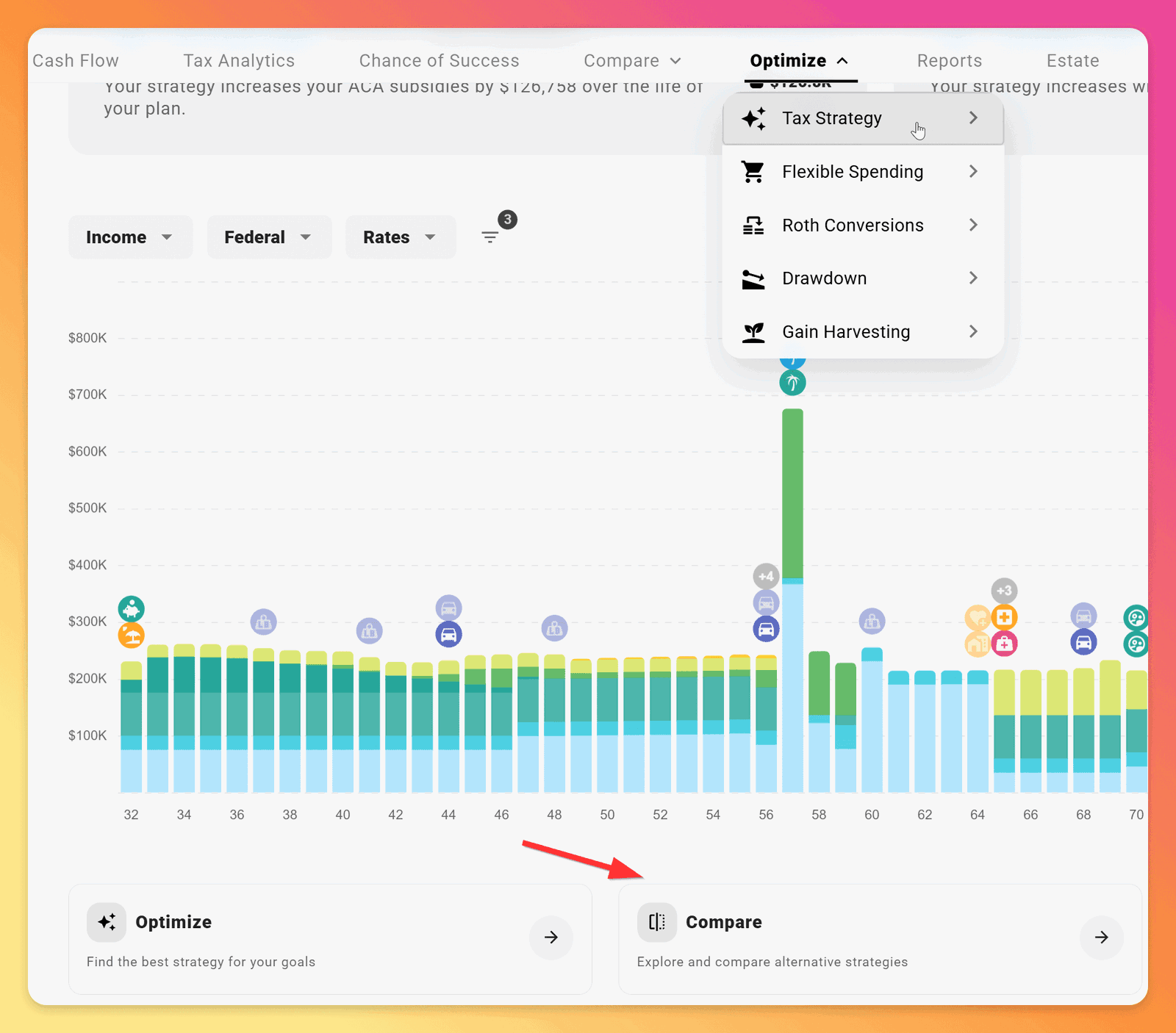
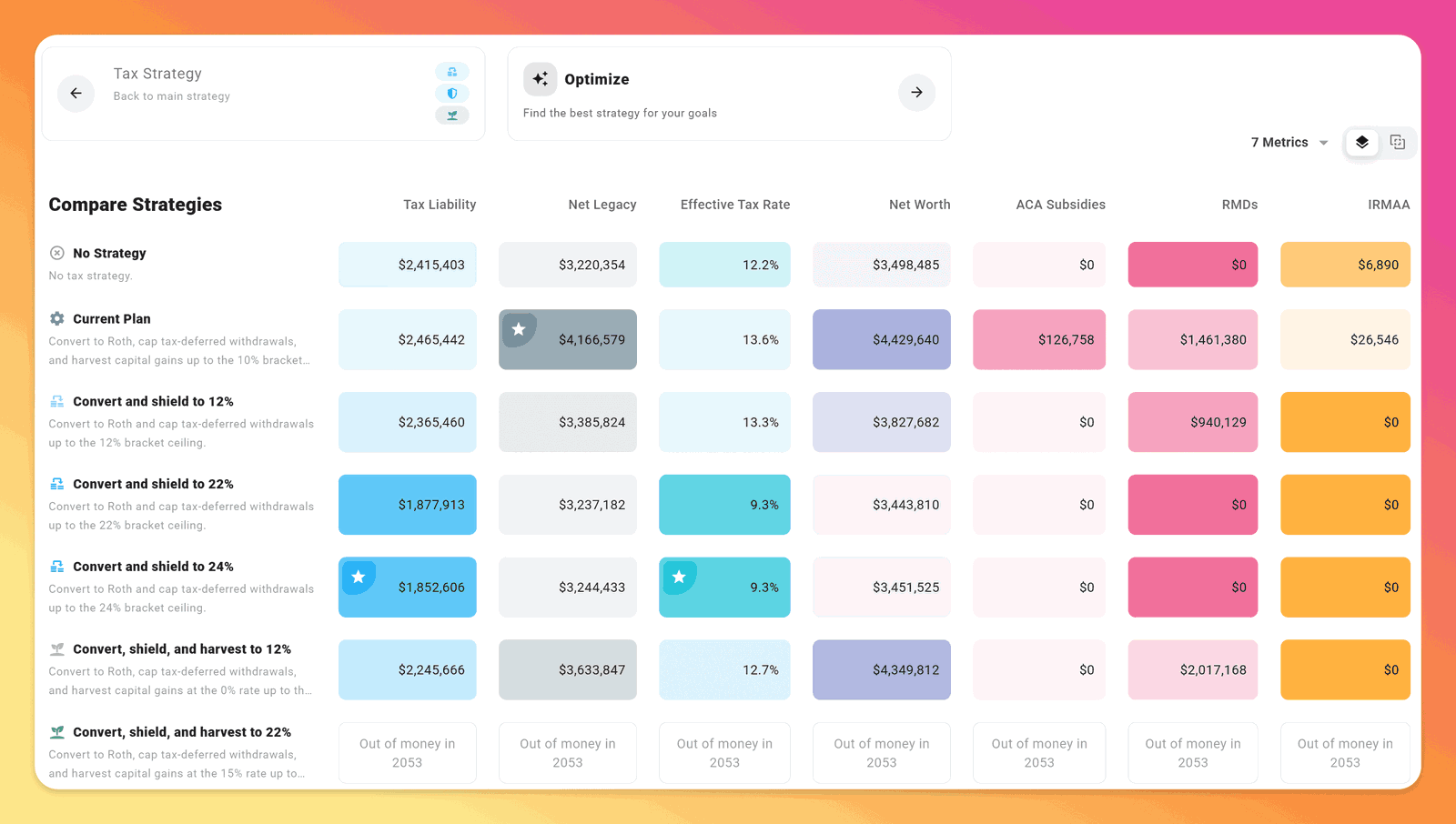
- Use the Tax Strategy Compare Matrix. Open Optimize -> Tax Strategy and scroll past the strategy settings and plot to find Compare. The matrix runs your plan against a set of common tax-strategy configurations and shows the impact on the metrics you care about (Net Worth, ACA Subsidies, Lifetime Tax Liability, and others), sortable by each. For early-retirement plans on ACA, this is the fastest way to see how Roth-conversion strategies trade off against preserved subsidies.
Related reading
- How to Navigate ACA Premiums in ProjectionLab covers initial setup of the ACA Marketplace expense, including the Advance Credit field referenced above.
- How do I model future ACA premium growth? covers the Change Over Time mechanics that drive your premium and benchmark over the plan’s horizon.
- How is tax calculated and visualized? explains the broader pattern of liability-versus-cash-flow that the Tax Balance panel uses across all tax types.
If you have a configuration question this article didn’t cover, reach out at help@projectionlab.com or join the conversation on the ProjectionLab Discord.
Related

Disclaimer: The content, tools, and resources on ProjectionLab.com are intended solely for informational and educational purposes and should not be construed as professional financial or investment advice. Our materials are designed to provide general guidance and are based on the input and data provided by users. ProjectionLab makes no guarantee of the accuracy, completeness, or applicability of this content to individual circumstances. Effective financial planning and investment involve comprehensive consideration of a wide array of personal financial factors. The tools and resources available on ProjectionLab are aimed at helping users develop an understanding of their financial trajectory. However, they should not be solely relied upon for creating a complete financial plan. We strongly recommend consulting a financial services professional who can provide personalized advice based on your unique financial situation before making any significant financial decisions. While we endeavor to keep the information on ProjectionLab current and accurate, the content may differ from that found on other financial institutions, service providers, or specific product sites. All content and tools on ProjectionLab are provided without any guarantees or warranties of any kind.